How does it work?
ConnTest uses standard network tools (like ping and traceroute) to test your connection. The results are shown in a clear and friendly way, so you can easily see if there are problems with your internet.
Main features
🚀 Automatic Mode
With one click, ConnTest automatically detects and tests:
Your local router (gateway)
The first router of your internet provider (ISP)
Google DNS (8.8.8.8)
✏️ Custom Mode
You can manually enter up to 3 IP addresses to test connectivity to specific devices or servers.
▶️⏸️ Start/Stop Tests
Start and stop connection tests easily.
📊 Real-time & Historical Data
View real-time and historical statistics.
🔍 Connection Quality Analysis
Analyze connection quality for specific devices or time periods.
💾 Export/Clear History
Export or clear your test history.
ConnTest – UI Interpretation
A tool that continuously monitors network latency by pinging selected IP addresses and logging the results.
🖥️ Left Panel
- Start analysis / Stop analysis: Starts or stops the pinging process.
- Auto-Discovery / Set custom IPs:
- Auto-Discovery: Automatically detects which IPs to ping.
- Set custom IPs (edit): Allows manual selection of IP addresses.
⚙️ Configurations Section
- Refresh time: ⏱️ Defines how often (in seconds) the UI refreshes to load new pings from the log file.
- This does not control the ping interval (which is always 1 second).
- Filters:
- Current day only:Shows only today's pings.
- Show lost pings only: Shows only entries with ping failures.
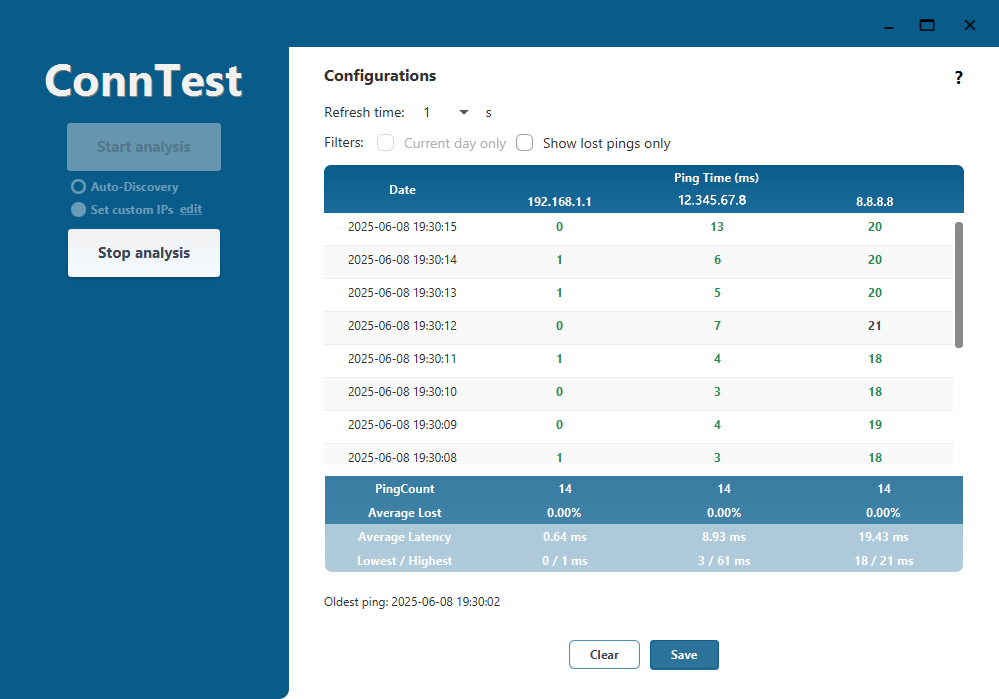
📊 Ping Table
Each row shows:
- Date: Timestamp of the ping.
- Ping Time (ms): Latency in milliseconds to:
- `192.168.1.1`: Local gateway/router
- `12.345.67.8`: ISP or intermediate hop
- `8.8.8.8`: Google Public DNS
Example:
Date: 2025-06-08 19:30:13
		192.168.1.1: 1 ms
		12.345.67.8: 5 ms
		8.8.8.8: 20 ms
📈 Summary Statistics
| Metric | 192.168.1.1 | 12.345.67.8 | 8.8.8.8 |
|---|---|---|---|
| PingCount | 14 | 14 | 14 |
| Average Lost | 0.00% | 0.00% | 0.00% |
| Avg. Latency | 0.64 ms | 8.93 ms | 19.43 ms |
| Lowest / High | 0 / 1 ms | 3 / 61 ms | 18 / 21 ms |
🕒 Footer
- Oldest ping:
Shows the earliest recorded ping:
2025-06-08 19:30:02 - Buttons:
Clear: Clears the current ping data.Save: Saves the session data to a file.
If you have any questions or need help, please contact the support team or check the user guide included with the application.